
AI Agents, MCP, and the Modern Framework Landscape
Listen to this article (experimental) · 16:15
How AI Agents Work
An AI agent is an LLM-driven system that operates in a loop:
- Plan: decompose a goal into sub-tasks.
- Act: select and invoke one or more tools.
- Observe: read tool results and update internal state.
- Iterate: repeat until the goal is met or a stopping condition is reached.
The most foundational example of this loop is ReAct (Reasoning + Acting). Introduced by Yao et al. in 2022, ReAct interleaves chain-of-thought reasoning traces with action steps. The agent thinks out loud about what to do, calls a tool, observes the result, and reasons again. It is effectively the "Hello World" of agent architectures: nearly every modern framework (LangChain, Semantic Kernel, ADK, Agents SDK) ships a ReAct-style loop as its default agent mode. Understanding ReAct is the prerequisite for understanding everything else in this article.
Optionally, agents incorporate memory (short- and long-term context) and human-in-the-loop checkpoints for safety-critical decisions.
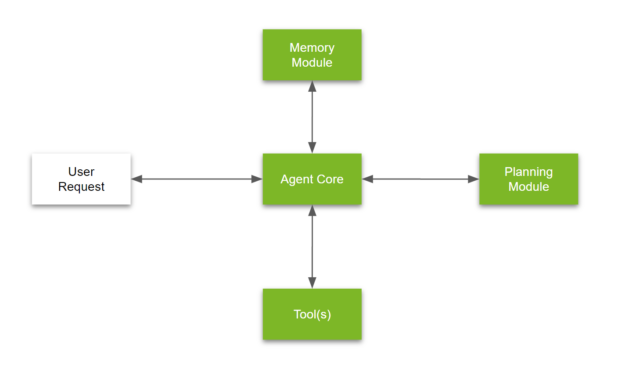
NVIDIA's canonical decomposition remains a useful mental model:
| Component | Role |
|---|---|
| Agent Core | LLM reasoning engine that drives the loop |
| Memory Module | Persists context across turns and sessions |
| Tools | External capabilities the agent can invoke |
| Planning Module | Strategy selection, task decomposition, re-planning |
Agents vs. Workflows (Anthropic's Distinction)
| Dimension | Workflows | Agents |
|---|---|---|
| Control flow | Hard-coded DAG | LLM-decided at runtime |
| Predictability | High | Lower, with higher variance |
| Auditability | Straightforward | Requires tracing |
| When to use | Known, repeatable processes | Open-ended or exploratory tasks |
Both belong to the same agentic systems family. Production systems frequently combine deterministic workflow steps with agent-driven sub-tasks where flexibility is needed.
Tools Are Semantic Contracts
Tools are semantic contracts. An agent reads a tool's name, description, and schema to decide whether and how to call it. If any of those signals are vague, the agent may:
- Call the wrong tool.
- Pass malformed inputs.
- Misinterpret outputs and hallucinate downstream.
Anthropic's research on writing tools for agents shows that treating tools like developer-facing products measurably improves completion rates and reduces token waste:
| Principle | What It Means in Practice |
|---|---|
| Strict schemas | Typed inputs/outputs with required vs. optional fields clearly marked |
| Helpful truncation | Large payloads are summarized; callers can request detail on demand |
| Clear error hints | Error messages tell the agent what to do next, not just what failed |
| Namespacing | Tool names scoped to a domain (e.g., legal.searchCases) to avoid collisions |
| Pagination | Bounded result sets with cursors, preventing context-window overflows |
| Evaluations | Automated test suites that measure agent success rate per tool |
Patterns: From Workflows to Full Autonomy
These patterns sit on a spectrum from fully deterministic to fully autonomous. Choose based on the level of control and variance your use case demands:
| Pattern | Description | Control Level |
|---|---|---|
| Prompt Chaining | Sequence of LLM calls; each step's output feeds the next. Optional quality gates between steps. | High |
| Routing | A classifier directs input to specialized prompts or tool sets. | High |
| Parallelization | Multiple LLM calls run concurrently, either sectioning (split task) or voting (same task, consensus). | Medium |
| Orchestrator–Workers | A manager agent dynamically decomposes a task, delegates to worker agents, and synthesizes results. | Medium–Low |
| Evaluator–Optimizer | One agent generates; another critiques; the loop refines until quality criteria are met. | Low |
Rule of thumb (Anthropic): Start with the simplest pattern that solves the problem. Escalate to full agent loops only when the task genuinely requires dynamic decision-making.
Real-World Example: GitHub Copilot in VS Code
GitHub Copilot's coding agent in VS Code is a good illustration of how these patterns combine in a shipping product:
- Routing. When you type a message, Copilot classifies intent: is this an inline completion, a chat question, or a multi-file edit? Each routes to a different pipeline.
- Orchestrator–Workers. In agent mode, Copilot receives a high-level task (e.g., "add input validation to the signup form"), breaks it into sub-tasks, and delegates each to specialized tool calls: read files, grep for symbols, run terminal commands, apply edits, run tests.
- Evaluator–Optimizer. After making changes, the agent runs linters, tests, or type-checkers. If something fails, it reads the error output, reasons about the fix, and iterates in a generate, evaluate, refine loop.
- Prompt Chaining with gates. Each step's output gates the next. If a file read returns unexpected content, the agent re-plans rather than blindly proceeding.
Under the hood, this is a ReAct loop backed by MCP-style tool integration: Copilot discovers available tools (file system, terminal, search, editor APIs), calls them via structured schemas, observes results, and reasons about next steps. It is a concrete example of a production system that blends deterministic workflows with agent-driven flexibility.
Copilot also lets you swap two key levers that directly affect behavior:
Model. Switching from, say, GPT-4o to Claude Sonnet or Gemini changes the reasoning engine. Different models have different strengths: some are better at planning multi-step edits, others at following instructions precisely, others at minimizing hallucinations. The same tools and the same prompt can produce noticeably different results depending on the model, which is why evals (Phase 4 in the implementation plan below) matter.
Mode. Copilot offers three built-in modes that sit at different points on the autonomy spectrum:
- Ask: a question-answer pipeline (prompt chaining). No file edits, no tool calls, just reasoning over context you provide.
- Agent: the full orchestrator-workers loop. It can read your codebase, run terminal commands, install dependencies, create files, and iterate on failures autonomously. This is the ReAct loop in action.
- Plan: a middle ground. The agent reasons through the task and produces a step-by-step plan, but waits for your approval before executing any changes. This is essentially the "human-in-the-loop checkpoint" pattern described earlier.
Moving from Ask to Plan to Agent increases flexibility but also increases variance, cost, and the importance of good tool schemas. You can also define Custom Agents with tailored instructions and tool sets, effectively creating a specialized routing layer for your own workflows.
Sessions. Copilot supports running multiple agent sessions in parallel, each with its own model, mode, and context. This turns the single-agent model into a practical parallelization pattern: you can have one session writing unit tests for a component, another implementing a new feature, another generating documentation, all running concurrently against the same codebase. This works especially well in architectures with clear module boundaries. In a Django project, for example, each app (authentication, billing, notifications) is largely independent, with its own models, views, URLs, and tests. You can safely spin up parallel sessions scoped to different apps with minimal risk of merge conflicts because the file surfaces barely overlap. The same principle applies to any codebase with well-defined package or service boundaries (microservices, monorepo packages, Go modules, etc.). In practice, parallel sessions let you trade wall-clock time for throughput, compressing what would be sequential work into concurrent work, as long as the tasks are sufficiently isolated.
The Framework Ecosystem
The ecosystem splits into three layers. Agent frameworks are where you build agents. MCP is the protocol that connects them to external tools. Governance layers manage fleets of agents at enterprise scale. They are complementary, not alternatives.
Agent Frameworks
Microsoft Agent Framework
- Currently in public preview (GitHub).
- Unifies Semantic Kernel (SK) and AutoGen under a single programming model.
- Adds typed, graph-based workflows with strong observability (built-in OpenTelemetry).
- Native MCP and A2A protocol integration.
- Multi-provider support: Azure OpenAI, OpenAI, Anthropic, Ollama, and more.
- Ships with a developer UI (DevUI) for inspecting agent traces.
OpenAI
OpenAI's agent stack is split across several products:
| Product | What It Is | Launched |
|---|---|---|
| Responses API | API primitive combining Chat Completions simplicity with built-in tool use (web search, file search, code interpreter, computer use, image generation). | March 2025 |
| Agents SDK | Open-source Python/Node library for orchestrating single- and multi-agent workflows (handoffs, guardrails, tracing). Successor to Swarm. | March 2025 |
| AgentKit | Higher-level toolkit bundling Agent Builder (visual workflow canvas), ChatKit (embeddable chat UI), and Connector Registry (centralized data-source management). | October 2025 |
The Agent Platform page is OpenAI's marketing umbrella for all of the above.
Google Agent Development Kit (ADK)
- Open-source, modular framework optimized for Gemini but model-agnostic.
- Supports single-agent and multi-agent topologies.
- Deployment targets:
- Vertex AI Agent Engine: fully managed, auto-scaling.
- Cloud Run: containerized, BYO infrastructure.
- GKE: Kubernetes-based deployment.
Interoperability Protocol
MCP (Model Context Protocol)
- Open standard originally created by Anthropic, now governed by The Linux Foundation and open to community contributions (protocol & SDKs, server registry).
- Clients (Claude, ChatGPT, VS Code, JetBrains IDEs, Cursor, etc.) attach to MCP servers that expose tool schemas.
- Rapidly becoming the de facto interoperability layer for agentic systems.
- Growing registry of community and vendor servers (GitHub, Azure DevOps, Notion, Playwright, Slack, databases, etc.).
- Key value: write your tools once, expose them to any MCP-compatible client, with no per-client integration work.
- All three frameworks above support MCP natively or via plugins.
Governance Layers
MuleSoft Agent Fabric (Salesforce)
- Enterprise governance layer for agent fleets:
- Registry: catalog of available agents and tools.
- Broker: routes requests to the right agent.
- Policies: access control, rate limiting, data-loss prevention.
- Observability: centralized logging and tracing.
- Supports MCP as a connectivity standard.
- Designed for organizations running dozens to hundreds of agents at scale.
Multi-Agent Teams
A growing pattern is containerized agent teams: groups of domain-specialized agents that collaborate under a shared governance envelope:
- AgentCatalog on Docker Hub is an early example: pre-built agent images for common tasks.
- Teams can be composed dynamically (e.g., a "contract review" team with a clause-extraction agent, a risk-scoring agent, and a summarization agent).
- Container orchestration (Kubernetes, Docker Compose) enables scaling, versioning, and rollback at the agent level.
- Internal governance and access policies can be enforced per container.
Reference Architectures
| # | Architecture | Key Components |
|---|---|---|
| 1 | Azure-first, workflow-heavy | Microsoft Agent Framework orchestrator to MCP server on Azure Container Apps to Azure AI services |
| 2 | OpenAI-first, builder-heavy | AgentKit / Agent Builder to Agents SDK to MCP server (any host) |
| 3 | GCP-first, ADK-centric | ADK agent on Vertex AI Agent Engine to MCP server on Cloud Run |
| 4 | Governed fleet | MuleSoft Agent Fabric broker to multiple MCP servers to policy enforcement layer |
All four converge on MCP as the tool-connectivity standard. The choice is driven by existing cloud footprint, vendor relationships, and governance requirements.
From Zero to Production: An Implementation Plan
Each phase has a clear deliverable and exit criteria so you know when to move on (or loop back).
Phase 1: Define Your Tool Surface
Goal: Decide what to expose before writing any code.
- Audit your system's existing APIs and workflows. Identify 3–5 high-value operations that agents would realistically call, e.g., searching documents, extracting entities, checking a case status, generating a summary.
- For each operation, answer:
- What are the required vs. optional inputs? (Strictly type them.)
- What does the happy-path output look like? What about the error output?
- Is the operation read-only or does it have side-effects?
- Write tool schemas (JSON Schema or equivalent) with:
- A clear, agent-readable
description. This is what the LLM sees to decide whether to call the tool. - A
modeparameter ("concise"|"detailed") to control output verbosity. - Cursor-based pagination (
cursor+limit) for list endpoints. - A
truncated: trueflag in responses so the agent knows to fetch more. - Teaching errors: error messages that tell the agent how to fix the call, not just that it failed.
- A clear, agent-readable
Deliverable: A schema document (OpenAPI or MCP tool definitions) reviewed by at least one person who did not write it.
Exit criteria: A teammate can read the schemas cold and correctly predict what each tool does, what inputs it needs, and what the output looks like.
Phase 2: Build the MCP Server
Goal: Turn the schemas into a running server that any MCP client can connect to.
- Implement each tool behind an MCP-compliant server (TypeScript or Python SDK).
- Choose your transport based on use case:
| Transport | When to Use |
|---|---|
| stdio | Local development, IDE integrations (VS Code, Cursor) |
| Streamable HTTP | Remote / cloud-hosted deployment, multi-tenant scenarios |
- Bake safety in from day one:
- Tools with side-effects must support a
dry_runmode (returns what would happen) and acommitmode (executes the action). - Destructive operations require a human-confirmation step before
commitproceeds.
- Tools with side-effects must support a
- Validate interoperability with at least two MCP clients (e.g., Claude Desktop + VS Code Copilot). If both can discover and correctly call every tool, the server is ready.
Deliverable: A deployed (or locally runnable) MCP server with passing integration tests against two clients.
Exit criteria: Both clients can complete a realistic multi-step task end-to-end using only the exposed tools.
Phase 3: Connect an Agent Framework
Goal: Prove the MCP server works with a real agent. Pick one framework to start.
Choose the framework that matches your team's stack:
| If your stack is… | Start with… |
|---|---|
| Azure / .NET | Microsoft Agent Framework |
| OpenAI-heavy / Python | Agents SDK + Agent Builder |
| GCP / Gemini | Google ADK on Vertex AI Agent Engine |
Build two things:
- A deterministic workflow: a fixed sequence of tool calls (e.g., "search, extract, summarize"). This validates that the tools compose correctly.
- A free-form agent: same tools, but the LLM decides the plan at runtime. This stress-tests your schemas: if the agent picks the wrong tool or passes bad inputs, your descriptions or error messages need work.
Optionally, repeat with a second framework to confirm the MCP server is truly framework-agnostic.
Deliverable: A working agent (workflow + free-form) that completes real tasks using the MCP server.
Exit criteria: The agent completes ≥ 80% of test tasks without human intervention.
Phase 4: Evaluate and Iterate
Goal: Measure how well agents use your tools, and fix what's broken.
- Create 10–20 realistic tasks with expected ground-truth outputs (e.g., "Find all contracts expiring in Q2 and summarize the key obligations").
- Run each task through both the workflow and free-form agent. For every run, capture:
| Metric | Why It Matters |
|---|---|
| Success rate | Did the agent reach the correct answer? |
| Tool-call count | Excess calls signal a confusing schema |
| Token usage | Proxy for cost |
| Latency | End-to-end and per-tool |
| Error rate by category | Reveals systematic tool-design issues |
- Triage failures:
- Wrong tool selected: improve the tool
description. - Wrong parameters: tighten the schema, add
enumconstraints, improve error hints. - Correct call, wrong interpretation of result: simplify the output format or add a
summaryfield.
- Wrong tool selected: improve the tool
- Re-run the eval suite after each fix. Track improvement over iterations.
Deliverable: An eval suite (automated, re-runnable) and a log of schema changes with before/after success rates.
Exit criteria: ≥ 90% success rate on the eval suite with both agent modes.
Phase 5: Harden and Scale
Goal: Prepare for production traffic and organizational rollout.
- Observability. Instrument the MCP server with distributed tracing (OpenTelemetry) and structured logging. Every tool call should be traceable from the client request through to the backend system.
- Rate limiting and access control. Decide who (which agents, which users) can call which tools, and at what throughput.
- Governance at scale. If you expect multiple MCP servers or agent teams, adopt a broker/fabric layer (e.g., MuleSoft Agent Fabric) for:
- Centralized policy enforcement.
- Audit logging (who called what, when, with what inputs).
- Fleet-level monitoring and kill-switches.
- Documentation. Publish a tool catalog (human-readable descriptions, example calls, known limitations) so other teams can build agents against your MCP server without reverse-engineering it.
Deliverable: A production-ready MCP server with monitoring dashboards, access policies, and a published tool catalog.
Exit criteria: A team that was not involved in building the server can stand up a new agent against it using only the catalog and public schemas.
Questions this article answers
What is the difference between an AI agent and a workflow?
Control flow. A workflow runs a hard-coded DAG, so it is predictable and straightforward to audit, while an agent lets the LLM decide the path at runtime, which buys flexibility at the cost of higher variance and a need for tracing. Both belong to the same agentic systems family, and production systems usually mix them, keeping deterministic steps where the process is known and handing agents the open-ended sub-tasks. Anthropic's rule of thumb holds: start with the simplest pattern that solves the problem and escalate only when the task genuinely requires dynamic decision-making.
Why does my agent keep calling the wrong tool?
Usually the description is at fault, not the model. The agent reads only a tool's name, description and schema to decide whether and how to call it, so vague signals produce wrong tool selection, malformed inputs, or misread outputs that turn into hallucination downstream. The triage is direct: wrong tool selected means improve the description; wrong parameters mean tighten the schema, add enum constraints, and write error messages that say how to fix the call; a correct call misinterpreted means simplify the output format or add a summary field.
Is MCP just another wrapper around the APIs I already have?
It is a wrapper with one specific payoff: write the tool once and any MCP-compatible client can use it, with no per-client integration work. Clients already include Claude, ChatGPT, VS Code, JetBrains IDEs and Cursor, and Microsoft Agent Framework, the OpenAI stack and Google ADK all support it natively or through plugins. It is an open standard created by Anthropic and now governed by the Linux Foundation, so adopting it is not a bet on a single vendor.
How do I know my MCP server is actually ready for production?
Use the exit criteria for each phase instead of a feeling. Two different MCP clients, for example Claude Desktop and VS Code Copilot, should each complete a realistic multi-step task end to end using only your tools; the free-form agent should finish at least 80% of test tasks without human intervention, and at least 90% of an eval suite of 10 to 20 realistic tasks. The final gate is not technical: a team that had nothing to do with building the server should be able to stand up a new agent against it using only the published catalog and schemas.
Read next
 AI Agents
I Built an AI Layer That Never Answers. Here Is What a Good Question Actually Takes
Field notes from OrbitSpec, a clarification engine that turns vague requests into typed, auditable Context Bundles before any model runs, and why reliability starts before the answer. AI Agents
I Built the Pipeline That Built My Product. Here Is What Delegation Actually Takes
Field notes from plan-to-pr, a pipeline that turns a feature request into tickets, an approval gate, and draft pull requests, and why delegating to coding agents takes artifacts, not chat.